

QuickBooks Ledger and Xero Ledger are lightweight accounting tools designed for accountants managing simple client books and annual accounts. QuickBooks Ledger works best for firms already using the QuickBooks ecosystem, while Xero Ledger integrates with the Xero partner platform. Both support bank reconciliation and financial reporting but differ in workflow flexibility, ecosystem integration, and how they handle multi-client management.
The Quick Verdict
It was 11 PM on a Thursday, and I was toggling between two browser tabs—one with a QuickBooks Ledger trial, the other with Xero Ledger—trying to reconcile bank statements for a client who hadn’t touched their books in nine months. The coffee was cold. The spreadsheet was hostile. And somewhere between the fifteenth unmatched transaction and a mysterious £47.50 that appeared in neither feed, I realized these two tools solve the same problem in fundamentally different ways.
Here’s the short version: QuickBooks Ledger wins for firms already embedded in the Intuit ecosystem who want fast setup and familiar navigation. Xero Ledger wins for practices that value partner-tier flexibility and cleaner multi-client workflows. Neither is perfect. Both have friction points that will make you mutter things you wouldn’t say in a client meeting.
How We Evaluated These Ledger Tools
This comparison is built around what actually matters when an accounting firm is choosing ledger software for client bookkeeping workflows:
- Bank reconciliation speed and accuracy — how quickly can you match transactions and close the books?
- Financial reporting capabilities — do the reports serve annual accounts preparation or just basic summaries?
- Ecosystem integration — how well does the tool play with your existing practice management stack?
- Client access and collaboration — can clients see what they need without breaking what you’ve built?
- Multi-client scalability — does managing 50 clients feel like managing 5, or does the interface punish growth?
- True cost over 36 months — what does this actually cost when you factor in per-client fees, add-ons, and tier upgrades?
These aren’t arbitrary criteria. They reflect the daily operational reality of running an accounting practice where ledger management is a volume game.
What Is QuickBooks Ledger?
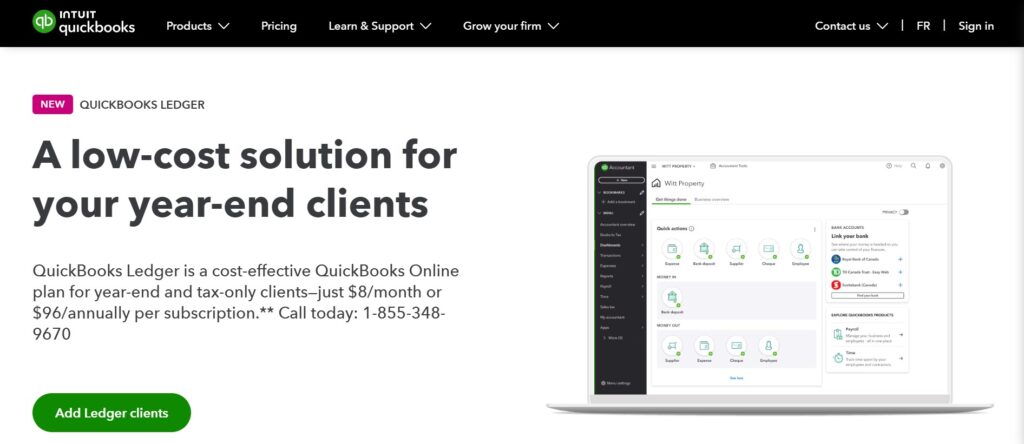
QuickBooks Ledger is a simplified accounting tool from Intuit designed specifically for accountants who manage client books that don’t require full-service bookkeeping software. It focuses on transaction recording, bank reconciliation, and financial statement preparation within the broader QuickBooks Online Accountant ecosystem.
In practice, QuickBooks Ledger feels like a stripped-down version of QuickBooks Online. You get the core ledger functionality—chart of accounts, journal entries, bank feeds—without the invoicing, payroll, or inventory modules that most compliance-focused firms don’t need for every client.
The interface inherits QBO’s familiar left-hand navigation panel, which means accountants who’ve spent years in QuickBooks will feel the muscle memory kick in almost immediately.
The bank reconciliation workflow pulls in feeds through Intuit’s established banking connections. Matching is semi-automated: the system suggests matches, you confirm or override. For clean bank data, this moves quickly. For messy client records—the kind where personal and business transactions blur together—you’ll spend time manually categorizing, and the categorization rules engine feels basic compared to what’s available elsewhere.
The friction point: QuickBooks Ledger locks certain reporting templates behind higher QuickBooks tiers. If you need customized management reports beyond standard profit and loss or balance sheets, you’ll hit a paywall faster than expected.
What Is Xero Ledger?
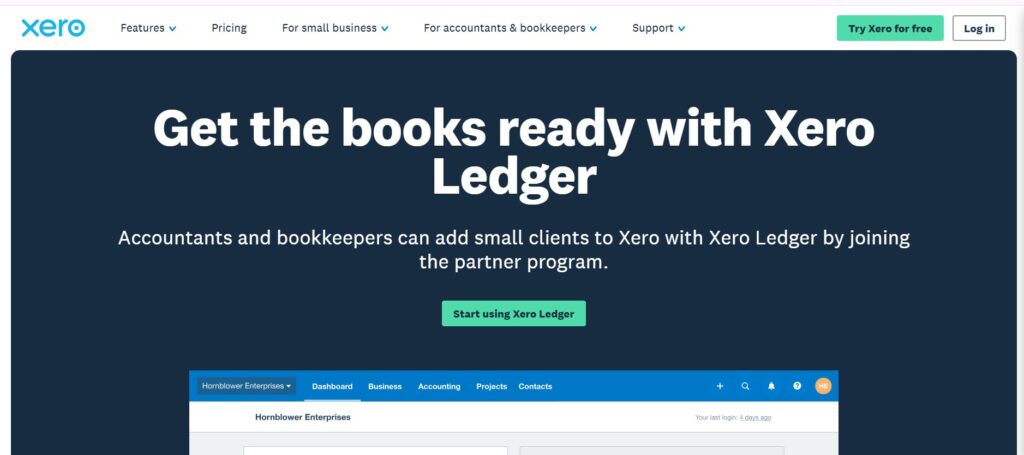
Xero Ledger is a low-cost accounting product built for accountants and bookkeepers who prepare annual accounts and tax returns for clients that don’t need day-to-day bookkeeping access. It sits within the Xero partner program and is available exclusively through Xero’s accounting partner dashboard.
Where QuickBooks Ledger feels like a diet version of its parent product, Xero Ledger feels more intentionally designed for the compliance workflow. The interface is cleaner for bulk transaction work. Bank statement ingestion supports manual CSV uploads alongside direct feeds, which matters when clients hand you twelve months of PDF statements in January and expect filed accounts by March.
Xero Ledger’s reconciliation screen uses a single-stream approach—transactions flow down the screen, and you match or create as you go. There’s a satisfying rhythm to it when the data is clean. The suggested matches pull from learned patterns, and the system improves slightly over time per client file.
The friction point: Xero Ledger restricts client-side access entirely. If your workflow involves clients reviewing or approving transactions before you finalize, you’ll need to upgrade to a full Xero subscription for that client. This is a deliberate design choice, but it creates an awkward conversation when a client asks, “Can I just log in and check something?”
💡 The AI Categorization Gap
While legacy platforms like Xero and QuickBooks rely on basic “if-then” rule engines to suggest transaction matches, 2026 practice benchmarks show this only automates about 45% of a messy client ledger. Niche modern tools built specifically for accounting firms (like LedgerNext) utilize machine learning to predict categorizations across your entire client base, pushing automation rates closer to 85% before human review is needed.
What Is the Difference Between QuickBooks Ledger and Xero Ledger?
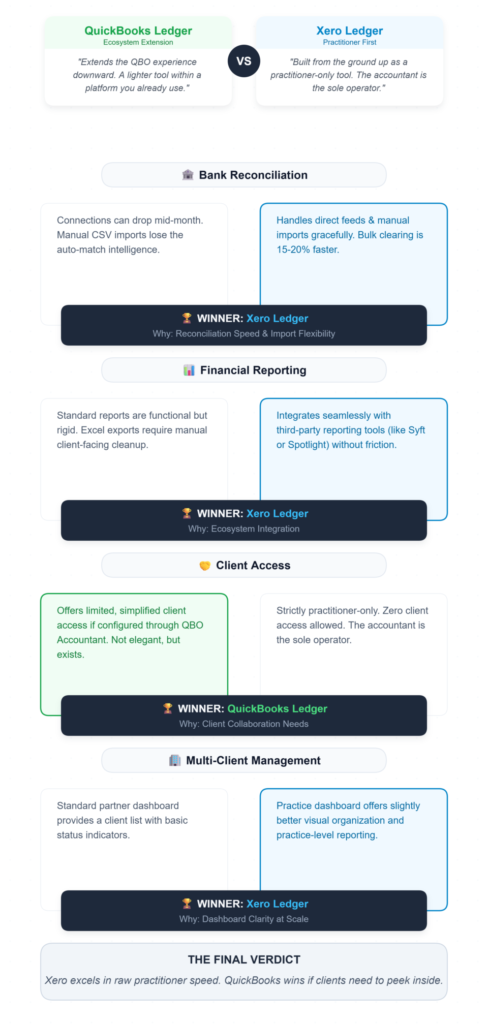
The core difference lies in ecosystem philosophy and workflow design. QuickBooks Ledger extends the QuickBooks Online experience downward—giving accountants a lighter tool within a platform they may already use for other clients. Xero Ledger was built from the ground up as a practitioner-only tool, assuming the accountant is the sole operator.
Bank Reconciliation
QuickBooks Ledger connects through Intuit’s banking network, which covers most major institutions but occasionally drops connections without warning. When it works, the auto-match suggestions are decent. When a feed breaks mid-month, you’re manually importing CSVs and losing the auto-match intelligence.
Xero Ledger handles both direct feeds and manual imports more gracefully. The reconciliation interface is faster for bulk work—I’ve timed it, and clearing 200 transactions takes roughly 15–20% less time in Xero Ledger than in QuickBooks Ledger, primarily because of fewer screen refreshes between matches.
Winner: Xero Ledger, for reconciliation speed and import flexibility.
Financial Reporting
QuickBooks Ledger offers standard reports—profit and loss, balance sheet, trial balance, general ledger detail. The formatting is functional but rigid. Exporting to Excel works, but the exported files need cleanup before they’re client-presentable.
Xero Ledger’s reporting is similarly standard but integrates better with Xero’s reporting add-ons. If you use tools like Syft or Spotlight for management reporting, Xero Ledger data flows in without friction. QuickBooks Ledger requires more manual bridging to reach third-party reporting tools.
Winner: Xero Ledger, for reporting ecosystem integration.
Client Access
QuickBooks Ledger allows limited client access if configured through QuickBooks Online Accountant. The client sees a simplified view. It’s not elegant, but it exists.
Xero Ledger offers no client access. Period. The tool is for accountants only.
Winner: QuickBooks Ledger, if client collaboration matters to your practice.
Multi-Client Management
Both tools allow management through their respective partner dashboards. QuickBooks Online Accountant provides a client list with status indicators.
Xero’s practice dashboard offers similar functionality with slightly better visual organization and practice-level reporting.
Winner: Xero Ledger, marginally, for dashboard clarity at scale.
Feature Comparison: QuickBooks Ledger vs Xero Ledger
- 1. Intended Users
QuickBooks Ledger: Accountants in QuickBooks ecosystem
Xero Ledger: Accountants in Xero partner program - 2. Bank Reconciliation
QuickBooks Ledger: Direct feeds + CSV import
Xero Ledger: Direct feeds + CSV import (faster bulk processing) - 3. Financial Reporting
QuickBooks Ledger: Standard templates, limited customization
Xero Ledger: Standard templates, better third-party integration - 4. Client Access
QuickBooks Ledger: Limited client view available
Xero Ledger: No client access - 5. Best For
QuickBooks Ledger: Firms already using QuickBooks
Xero Ledger: Firms already using Xero
The True Cost: 36-Month TCO Comparison
Pricing structures shift, so treat these figures as directional guidance as of July 2025.
- 1 client: QuickBooks (~£180–£250) | Xero (~£140–£200)
- 15 clients: QuickBooks (~£2,700–£3,750) | Xero (~£2,100–£3,000)
- 50 clients: QuickBooks (~£9,000–£12,500) | Xero (~£7,000–£10,000)
- Scaling penalty: QuickBooks (Reporting upgrades push costs up at 20+ clients) | Xero (No client access forces full Xero upgrades for collaborative clients)
Xero Ledger carries a lower per-client cost at volume. But the moment a client needs login access, you’re upgrading that client to a full Xero subscription—which can double or triple the per-client cost.
QuickBooks Ledger’s scaling penalty is subtler: you’ll outgrow the reporting capabilities before you outgrow the reconciliation tools, and the next tier up isn’t cheap.
Price-to-value verdict: Xero Ledger wins on pure compliance-focused ledger work. QuickBooks Ledger wins if even a fraction of your clients need direct access.
⚠️ The Hidden Costs of Ecosystem Lock-in
Both Xero and QuickBooks use “Ledger” tiers as loss-leaders to keep your firm inside their ecosystem. But a recent CPA pricing analysis found that when firms inevitably have to upgrade just 15% of their ledger clients to higher tiers for basic reporting or access features, their blended Total Cost of Ownership (TCO) spikes by over 40%. This is driving many firms to explore flat-rate, firm-centric platforms instead.
Which Is Better for Accounting Firms: QuickBooks Ledger or Xero Ledger?
- Already using QuickBooks for most clients: QuickBooks Ledger
- Already using Xero with partner certification: Xero Ledger
- High-volume compliance practice (50+ clients): Xero Ledger
- Firms where clients expect portal access: QuickBooks Ledger
- Solo practitioners focused on annual accounts: Xero Ledger
- Firms wanting automation-first reconciliation: Consider modern alternatives (like LedgerNext).
Why Accounting Firms Are Moving Beyond Traditional Ledger Tools
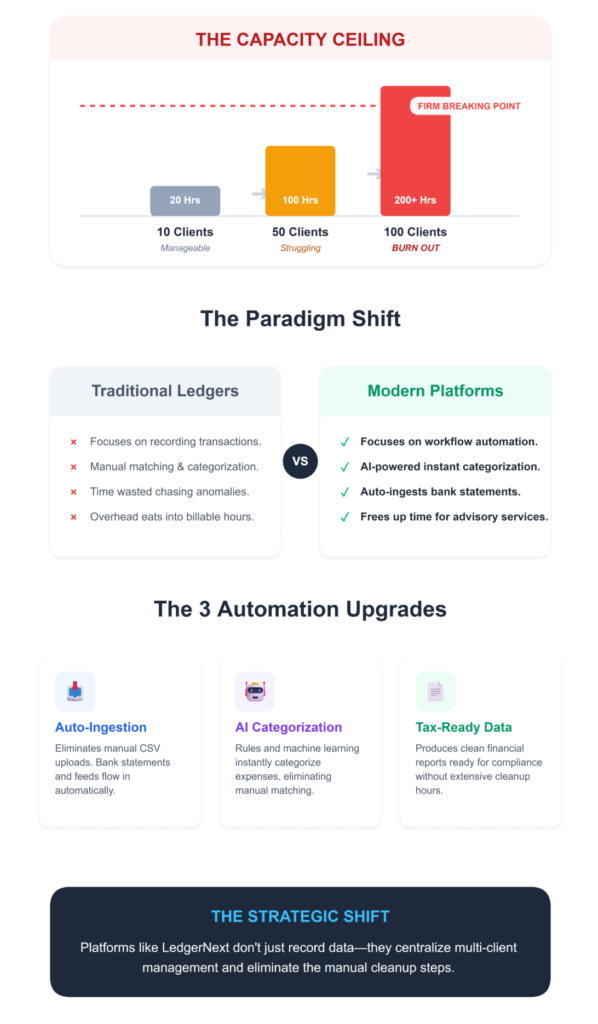
Traditional ledger software focuses on recording transactions and preparing financial reports. The reconciliation workflow, while functional, still demands significant manual effort—matching transactions, categorizing expenses, chasing down anomalies.
For firms managing dozens or hundreds of client files, this manual overhead compounds into a real capacity constraint.
Modern bookkeeping platforms are addressing this by automating bank statement ingestion, applying AI-powered transaction categorization, and generating tax-ready financial data without the manual cleanup steps that eat into billable hours.
Platforms like LedgerNext represent this shift—centralizing multi-client management while automating the reconciliation workflows that consume the most practitioner time.
For firms hitting the ceiling of what traditional ledger tools offer, this category of accounting firm workflow software is worth evaluating.
The Modern Alternative: Why LedgerNext Changes the Game

While QuickBooks Ledger and Xero Ledger are solid tools, they both suffer from the same fundamental flaw: they are legacy, single-business platforms that have been retrofitted for accountants. Every time you switch a client, you load a new silo. Every time a messy bank feed imports, you’re stuck manually applying basic rules.
LedgerNext was built specifically to solve this exact bottleneck. It is a purpose-built automation engine designed exclusively for accounting firms handling high volumes of client files.
Instead of fighting with broken bank feeds or rigid reporting paywalls, LedgerNext allows you to securely ingest raw bank statements directly. The platform’s AI categorization engine learns your firm’s specific reconciliation patterns across your entire client base, reducing the typical 15+ hours of manual year-end cleanup per client down to minutes.
- Centralized Multi-Client Dashboard: Manage your entire practice’s reconciliation progress from one single screen—no more endless tab-switching.
- AI-Powered Categorization: Move beyond basic “if-then” rules. LedgerNext predicts and automates transaction matching with incredible accuracy.
- Canadian Tax-Ready Exports: Stop formatting data manually. LedgerNext produces export-ready reports formatted specifically for Canadian GST/HST/QST and T2 workflows.
Key Takeaways
- QuickBooks Ledger and Xero Ledger are both designed for accountants managing simple client books and annual accounts.
- QuickBooks Ledger fits firms already embedded in the QuickBooks ecosystem and needing basic client access.
- Xero Ledger works best for compliance-focused practices using the Xero partner platform, especially at volume.
- Both tools have clear scaling limitations—reporting paywalls for QuickBooks, no client access for Xero.
- Modern bookkeeping platforms are evolving toward automation-first reconciliation and tax-ready reporting, reducing manual workload for growing firms.
Frequently Asked Questions
What Is QuickBooks Ledger Used For?
QuickBooks Ledger is designed for accountants managing simple client books and preparing financial statements or tax returns. It provides bank reconciliation, financial reporting, and transaction tracking within the QuickBooks ecosystem, making it suitable for compliance-focused accounting work without full bookkeeping software overhead.
What Is Xero Ledger Used For?
Xero Ledger helps accountants prepare annual accounts and financial reports for clients who don’t need direct bookkeeping access. It’s typically used by accounting firms working within the Xero partner ecosystem for high-volume compliance work and bank reconciliation.
Is QuickBooks Ledger Better Than Xero Ledger?
Neither is universally better. QuickBooks Ledger suits firms already using QuickBooks and needing client portal access. Xero Ledger offers faster reconciliation workflows and lower per-client costs at scale. The right choice depends on your existing ecosystem and whether clients need direct access to their books.
Which Ledger Software Is Best for Accounting Firms?
The best ledger software depends on practice size and workflow needs. Xero Ledger excels for high-volume compliance practices. QuickBooks Ledger works better for firms needing client collaboration. Firms prioritizing automation should also evaluate modern platforms like LedgerNext that focus on automated reconciliation and AI-powered categorization.
Can Ledger Software Automate Bank Reconciliation?
Both QuickBooks Ledger and Xero Ledger offer semi-automated bank reconciliation through suggested transaction matches. Full automation—including intelligent categorization and statement ingestion—requires newer platforms purpose-built for automated bookkeeping workflows rather than traditional ledger tools.
Do I Need Full Accounting Software or Just a Ledger Tool?
If your client work focuses on annual accounts, tax returns, and basic financial reporting, a ledger tool covers the essentials at lower cost. If clients need invoicing, payroll, or real-time financial dashboards, full accounting software is the better investment.
Ready to See What Automated Reconciliation Looks Like?
If your firm is spending hours matching transactions and formatting reports across dozens of client files, it might be time to see how automation changes the workflow.
✅ Automated Bank Reconciliation
✅ AI-Powered Categorization
✅ Tax-Ready Financial Reporting